I recently published a project webasgi a static site allows you run FastAPI and other asgi apps (such as litestar) right in the browser.
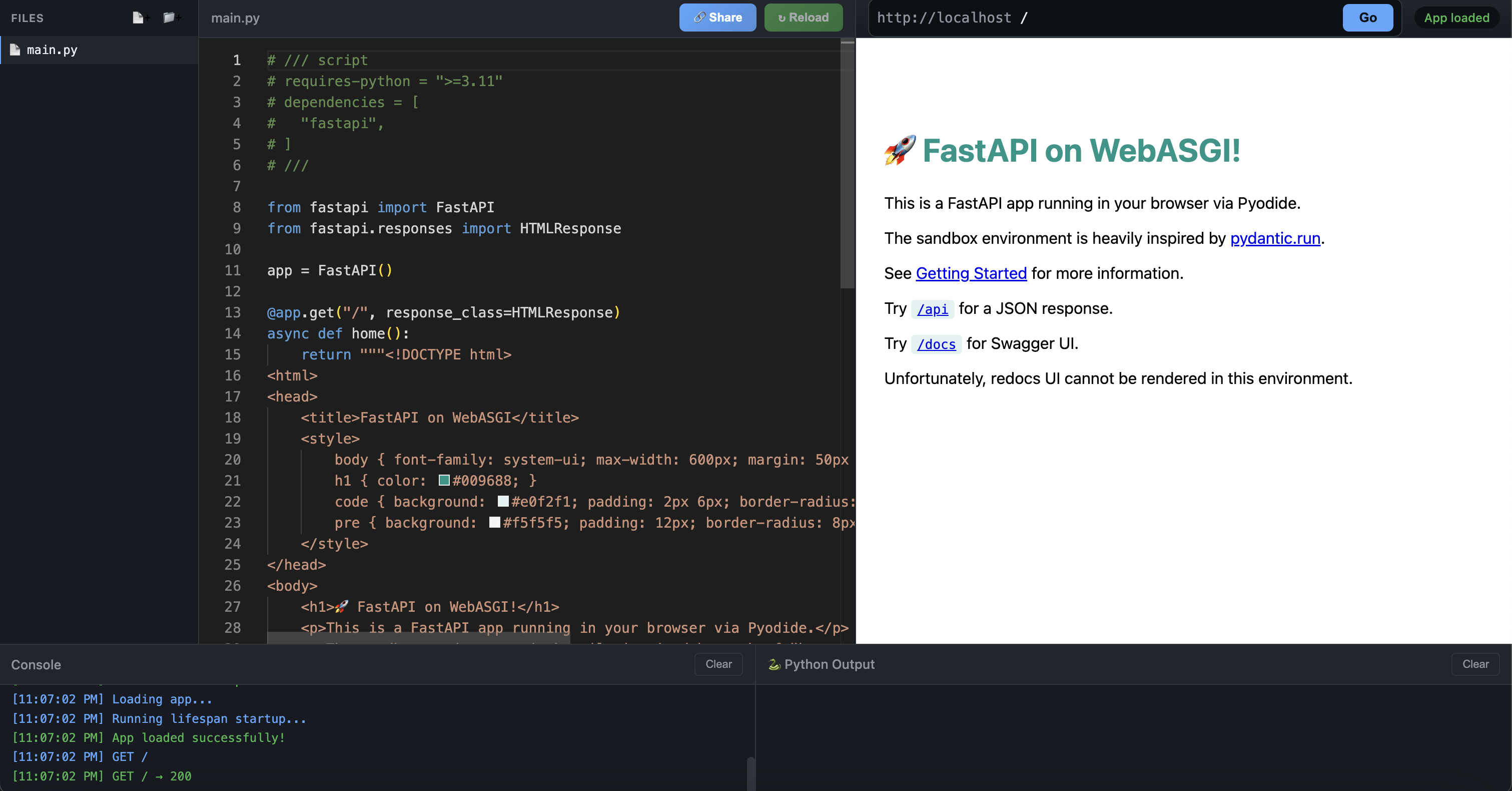
As you can imagine, Python web apps are not designed to run statically in the browser, and this project has been particularly challenging to me, in fact it's taken me over a year and a very productive AI coding session to get this done.
Vibe coding
Let's get the AI coding stuff out of the way!
I used Google's new antigravity editor with Claude Opus to do most of the coding. This is mostly a concession for me as I don't have the time or expertise in Javascript to do a lot of the work. I do feel that in some sense I robbed myself the opportunity to learn through the process of coding, however the design of the app is the most interesting and what we'll focus one in this post.
The last thing I'll say is that, this is not the first time I've attempted to use AI tools to help me code up this project, but it's the first time successful. This is probably owing to the newer models and the fact that Pyodide is more popular now and likely more present in the model's knowledge.
In any case, the AI discussion will have to carry on another day ...
Pyodide
I've already used pyodide before. I've used it in several past posts:
- My Chinese birthdays, time keeping is hard!: pyscript shell using pyodide.
- My SQLAlchemy Cookbook: jupyter-lite notebook powered by pyodide
- Trying out marimo notebooks: marimo notebook also powered by pyodide.
Pyodide is an amazing project that brings a Python to the browser using WASM. The entire Python runtime is contained within the browser with no additional server required, therefore it also has the benefit of being able to run user generated Python code safely.
As such, it's already being used to create sandboxes. A prominent example is, pydantic.run which is also the inspiration of my project.
ASGI (Asynchronous Server Gateway Interface)
ASGI provides an abstraction for all Python web applications. Effectively splitting the web server into two components:
- The application itself which in its simplest form is an async function that takes a request and returns a response. E.g. fastapi.
- The web server that handles the connections and scaling. This comes in the form of libraries with horse sounding names such as uvicorn, hypercorn and granian.
This is quite a clean abstraction, allowing both sides to evolve independently, and giving the user a good amount of flexibility. One of my favourite consequences of ASGI is that we can quite easily compose ASGI applications, as seen here with a FastAPI app that mounts a Litestar app under a subpath.
The server's implementation can also be very flexible, uvicorn and hypercorn are both Python implementation where granian is written in rust.
Naturally a Pyodide implementation is also possible, but instead of connecting to a port in the operating system, we can mock the 'networking layer' in browser javascript.
Browser Emulation
Having worked out the basics of the Pyodide "server" the next step is to display the contents returned by the server. This is necessary as it's part of a standard FastAPI workflow:
- write some FastAPI code.
- run the code with a server like Uvicorn.
- check the server by calling the endpoint in your browser. (often using swagger docs)
Without a clean way to visualise the output, it's always going to feel a little awkward.
Emulating a browser means taking html which may contain linked javascript and css loading everything and rendering it. This all needs to take place without leaking into the parent browser session, that is, we don't want the emulated browser to crash out current tab.
Luckily this is exactly what iframe does and we can pass the html as srcDoc.
The hard part ...
We've figured out how to render the responses however we're only just getting started.
The rendered html page can contain elements that make further requests to the server. These can be relative anchor links:
<a href="/other-endpoint">go to next</a>
Or some non-get requests via javascript or form submission. Without changing anything, these requests will not be able to go to the ASGI server, breaking the "immersion".
If we want everything to work as a browser would, we'd need to load some javascript first that patches all of these requests. This is done by injecting some scripts in the html that register javascript event handlers to intercept these events. The iframe has the ability to them securely send a message to the parent via postMessage
Everything put together
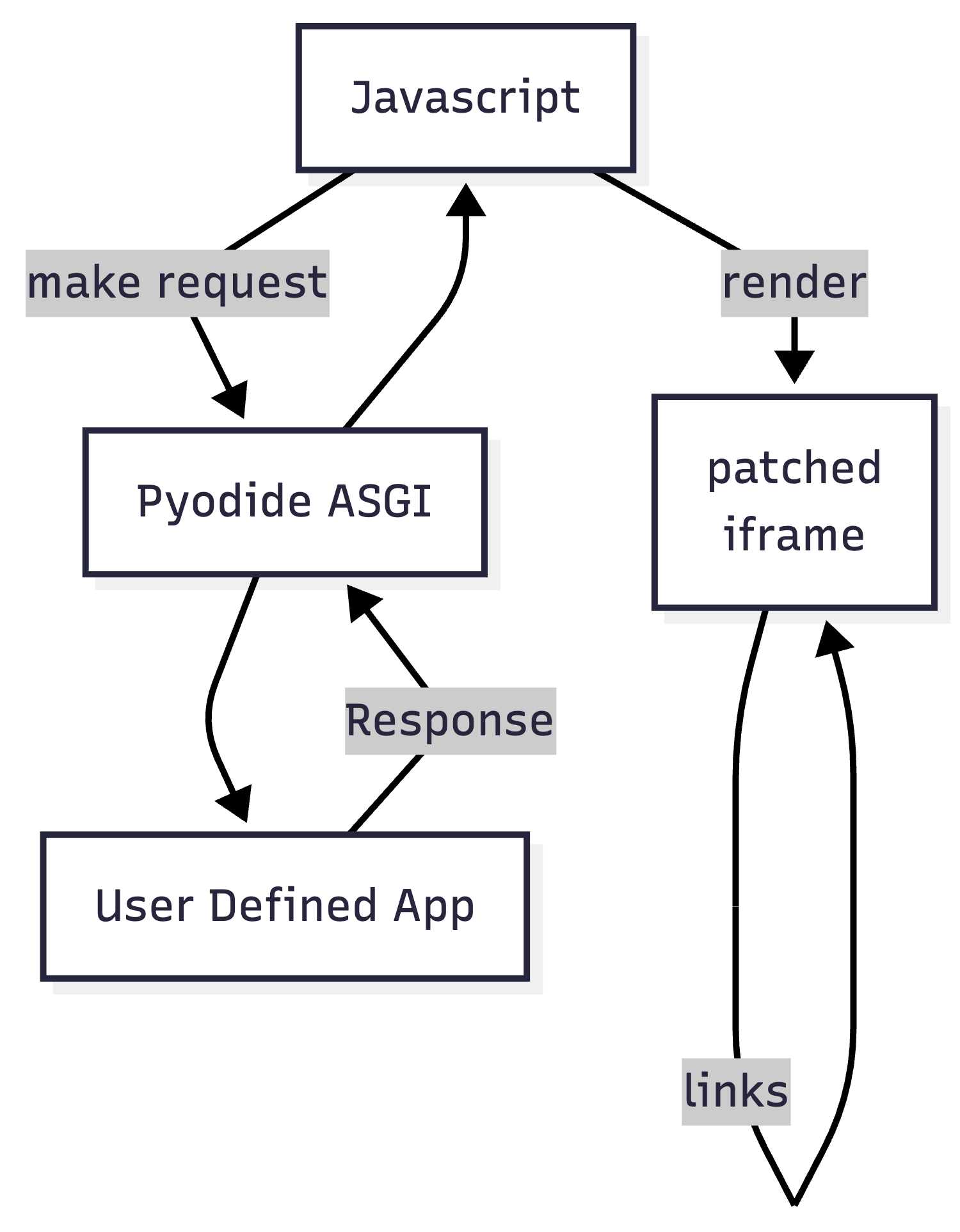
This is roughly what the full architecture looks like, the rest is mind numbing javascript implementation you can check out here.
Why?
So why did we do all this?
Being able to run more things in the browser dramatically lowers the barrier to entry. A functional app can be created iterated and shared in the browser.
My immediate next steps are to improve the user experience using AI or otherwise but also to try and tidy up the AI generated parts of the code.
But my long term goal for this is to:
- teach and discuss more advanced patterns in these web app frameworks
- encourage adoptions of new frameworks that solve some of my headaches with frameworks like fastapi.